| bin | ||
| docs/images | ||
| lib | ||
| plugin-src | ||
| scripts | ||
| test | ||
| .gitignore | ||
| cordis.patch.yml | ||
| LICENSE | ||
| package-lock.json | ||
| package.json | ||
| README.md | ||
| THIRD_PARTY_NOTICES.md | ||

dsh-im
中文
通过扫码把 IM 机器人接入 DeepSeek Harness。一个插件、一个设置入口,统一管理飞书、微信和钉钉机器人。
GitHub 简介:通过扫码把IM机器人接入DeepSeek Harness(支持飞书、微信、钉钉等)。
界面
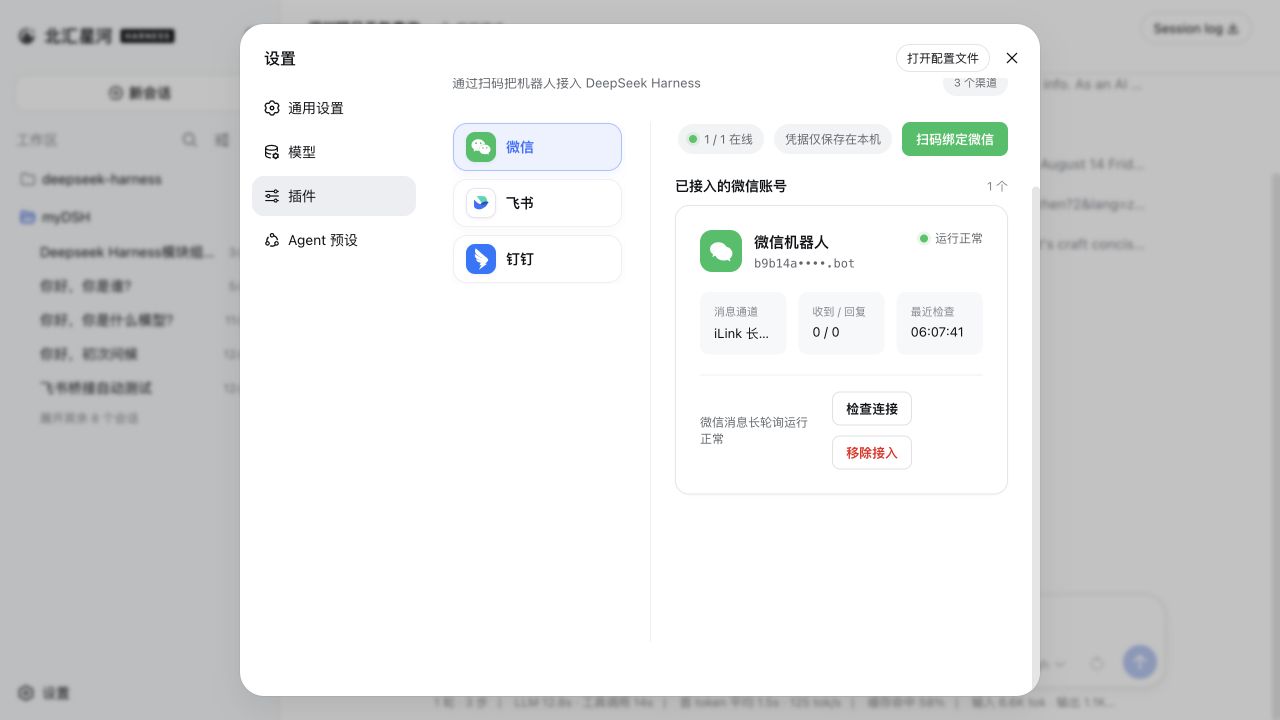
当前内置渠道
- 飞书:扫码创建并绑定机器人,使用长连接收发消息;
- 微信:扫码绑定微信机器人,使用腾讯 iLink 长轮询收发消息;
- 钉钉:扫码创建并授权机器人,使用钉钉 Stream 长连接收发消息。
其他 IM 平台可继续按同一渠道适配器结构接入。
安装
npx -y github:xmanrui/dsh-im install
重启 dsh web,然后打开「设置 → 插件 → IM机器人」。安装器会用 dsh-im 替换 profile 中直接安装的 dsh-feishu、dsh-weixin 和 dsh-dingtalk,但不删除任何渠道数据;原有渠道凭据和扫码绑定会继续使用。
钉钉接入时,请使用已加入企业/组织且有权创建机器人的钉钉账号扫描页面二维码,再在钉钉授权页点击「一键创建新机器人」。若提示“该账号还未加入组织”,请先创建组织或换用已加入组织的账号后重新扫码。钉钉当前可能在该官方授权页显示 OpenClaw 品牌;扫码后的机器人连接、凭据和消息均由 DeepSeek Harness 管理。由于扫码结果不包含扫码人的 staff ID,首次私聊后还需要在本机页面批准该使用者,未批准消息不会进入 Harness。
设计
- Harness 中只注册一个「IM机器人」设置页;
- 左侧使用渠道 Logo 切换微信、飞书和钉钉,不使用启用/停用开关;
- 三个渠道保持独立的 RPC、凭据、连接监督和会话映射;
- 浏览器只获得二维码和脱敏状态,不获得 App Secret、
bot_token、钉钉client_secret或原始 staff ID。
本地开发
npm install
npm run check
node bin/dsh-im.mjs install --source .
npm run check 运行单元测试、构建 Host/Client 产物,并验证发布包不包含凭据或独立渠道设置页注册。
English
Connect IM bots to DeepSeek Harness by scanning a QR code. One plugin and one settings entry provide unified management for Feishu, WeChat, and DingTalk bots.
GitHub description: Connect IM bots to DeepSeek Harness by scanning a QR code (supports Feishu, WeChat, DingTalk, and more).
Interface
Built-in channels
- Feishu: create and bind a bot by scanning a QR code, then send and receive messages over a persistent connection.
- WeChat: bind a WeChat bot by scanning a QR code, then send and receive messages through Tencent iLink long polling.
- DingTalk: create and authorize a bot by scanning a QR code, then send and receive messages through DingTalk Stream.
Other IM platforms can be added through the same channel-adapter structure.
Installation
npx -y github:xmanrui/dsh-im install
Restart dsh web, then open Settings → Plugins → IM Bot. The installer replaces directly installed dsh-feishu, dsh-weixin, and dsh-dingtalk entries in the profile with dsh-im without deleting channel data.
For DingTalk, scan with an account that belongs to an enterprise or organization and can create bots, then choose Create a new bot on the authorization page. If DingTalk reports that the account has not joined an organization, create one or switch to an account that has, then scan again. That DingTalk-hosted page may currently display OpenClaw branding; the resulting connection, credentials, and messages are managed by DeepSeek Harness. Because the scan result does not identify the scanning user, send the bot a direct message and approve that sender locally before the message can enter Harness.
Design
- Registers a single IM Bot settings page in Harness.
- Uses channel logos for WeChat, Feishu, and DingTalk navigation without enable/disable switches.
- Keeps RPC endpoints, credentials, connection supervision, and session mappings isolated by channel.
- Sends only QR codes and redacted status data to the browser, never App Secrets,
bot_token, DingTalkclient_secret, or raw staff IDs.
Local development
npm install
npm run check
node bin/dsh-im.mjs install --source .
npm run check runs unit tests, builds the Host and Client artifacts, and verifies that the published package contains neither credentials nor standalone channel settings-page registrations.